Free download
Free quotation format in Word, Excel & PDF
Download professional quotation formats and customise the products or services, pricing, GST, payment terms and customer details. Share a clear, consistent quote every time.
- Excel, Word and PDF
- Free download
- Itemised pricing with GST
Free downloads
Download free quotation formats
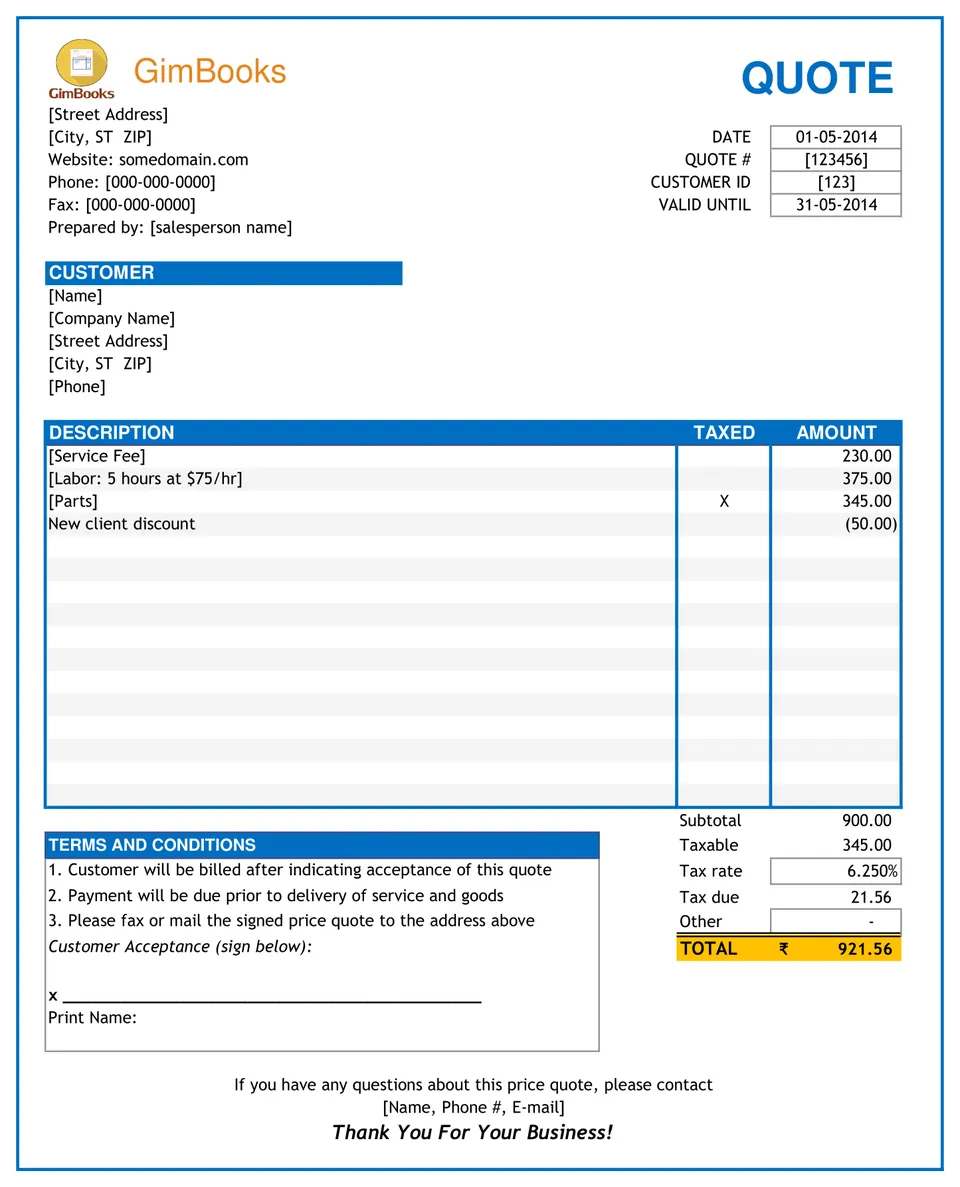
A good quotation shows item-wise pricing, taxes, materials, labour charges, delivery timelines and payment terms. Pick the format that matches how you build and send quotes.
-
Quotation format in Excel
Enter customer details, products or services, quantity, unit price, discount, taxable amount, GST, total and payment terms, with totals calculated for you. Best for retailers, wholesalers, distributors, manufacturers, contractors and service businesses.
Download Excel format .xlsx file · 47 KB -
Quotation format in Word
A simple editable layout for detailed service descriptions, terms and conditions, company branding and signature sections. Keeps every quotation consistent and saves time.
Download Word format .docx file · 19 KB -
Quotation format in PDF
Share the quotation on WhatsApp or email, print it, keep the final formatting intact, and hold on to a fixed copy of what you quoted.
Download PDF format .pdf file · 86 KB
Try GimBooks free for 7 days
Make quotations in seconds and manage all your billing with GimBooks.
What is a quotation format?
A quotation format is a structured document businesses use to present the price of products or services to a prospective customer before an order is confirmed. A professional quotation typically includes:
- Business and contact details
- Customer details
- Quotation number and date
- Product or service details
- Quantity, unit and price
- Applicable GST and total amount
- Validity and payment terms
- Delivery terms and authorisation
Quotation vs invoice: a quotation is a price proposal, not a tax invoice. Once the sale is confirmed, issue the appropriate invoice.
Why quotation formats matter
A clear, professional quotation communicates pricing accurately and gives customers what they need to decide.
- Clear pricing: products, services, taxes and totals laid out plainly.
- Professional presentation: the same consistent format for every customer.
- Fewer misunderstandings: pricing, validity and payment terms defined up front.
- Smoother sales: a clear proposal before the customer confirms the order.
Want to skip the template? The free GimBooks quotation maker creates a professional GST quotation in your browser, ready to download and share.
Checklist
What should a professional quotation include?
A clear quotation gives the customer everything they need to understand the products, pricing, taxes and commercial terms.
-
Seller details
Business name, address, phone number, email and GSTIN, where applicable.
-
Customer details
Name or business name, address, contact information and GSTIN, where applicable.
-
Quotation information
Quotation number, quotation date and a valid-until date.
-
Product or service details
An itemised table with description, quantity and unit, rate and amount, and HSN/SAC where relevant.
-
GST & total
Taxable amount, applicable GST rate, CGST & SGST or IGST, and the total quotation value.
-
Commercial terms
Payment terms, delivery timeline, quote validity, warranty and other conditions.
Which quotation format should you use?
| Format | Best for | Main benefit |
|---|---|---|
| Excel | Product-based businesses | Easy calculations and editable pricing |
| Word | Services, freelancers and contractors | Easy text and layout changes |
| Sending final quotations | A professional, fixed-format document | |
| Online quotation maker | Businesses that quote regularly | Create, save, edit and share quotations faster |
GST quotation format
A GST quotation shows the proposed price of goods or services along with the applicable GST. Include:
- Seller GSTIN
- Buyer GSTIN, where applicable
- Product or service description
- HSN/SAC code, where relevant (find it with the HSN finder)
- Taxable value and applicable GST rate
- CGST & SGST for intra-state transactions
- IGST for inter-state transactions
- Total quotation value
Important: a quotation is a commercial price proposal, not a tax invoice. Showing the expected GST makes the final price clearer, but do not confuse the quotation with the tax invoice issued for the actual supply.
Quotation vs invoice: what’s the difference?
A quotation proposes pricing before a sale; an invoice records the transaction and its tax details.
| Quotation | Invoice |
|---|---|
| Sent before the sale is confirmed | Issued for an actual supply, as applicable |
| Shows proposed pricing | Records the transaction |
| Can include a validity period | Contains the applicable tax-invoice details |
| Helps customers evaluate an offer | Used for accounting and tax purposes |
| Can be revised before acceptance | Normally records the finalised transaction |
A quotation should never be presented as a replacement for a tax invoice. When the customer accepts, raise the invoice: see the GST invoice format or the proforma invoice format.
Beyond templates
Create, track and convert quotations with GimBooks
Create professional quotations, manage customer responses and move accepted quotes to the next stage of the sale, all from one place on the web and mobile.
What you get in GimBooks
- Create and customise professional quotations
- Add products and pricing, with quotation numbers managed for you
- Track quotation status and duplicate existing quotes
- Download as PDF and share with customers
- Convert quotations into proforma invoices
- Convert quotations into tax invoices
FAQ
Quotation format FAQs
Can't find what you need? Call us or write to our support team.
What is a quotation format?
A quotation format is a structured document used to present the proposed price, products or services and commercial terms to a prospective customer before the sale is finalised.
What should a quotation include?
A professional quotation generally includes seller and buyer details, quotation number, date, validity, itemised products or services, pricing, applicable taxes and commercial terms.
Is GST mandatory on a quotation?
A quotation is not a tax invoice. If GST applies to the proposed transaction, you can show it in the quotation so the customer knows the expected total.
Can I create a quotation in Excel?
Yes. Excel is widely used for quotations because you can edit product details and calculate quantities, prices, taxes and totals.
Can I create a quotation in Word?
Yes. Word works well for editable quotations, especially for service businesses, contractors and freelancers.
What is the difference between a quotation and an invoice?
A quotation is a proposed price offer made before the transaction. An invoice records the actual supply and its tax details.
Can a quotation be converted into an invoice?
Yes. Billing software such as GimBooks lets you convert an accepted quotation into a proforma invoice or tax invoice without typing the details again.
How long should a quotation be valid?
There is no single validity period for every business. Set it based on price changes, material costs, project timelines and your commercial terms.
Can I send a quotation on WhatsApp?
Yes. Download the quotation as a PDF and share it on WhatsApp, email or any other channel.
Is there a free quotation maker?
Yes. The GimBooks online quotation maker is free: create, customise, download and share quotations from your browser.
Free formats
More free business document formats
Ready-to-use templates for the rest of your billing, buying and shipping paperwork.
-
GST invoice format
Bill goods and services with GSTIN, HSN/SAC, tax split and totals.
-
E-invoice format
Use an e-invoice format for IRN-linked GST invoice workflows where applicable.
-
Proforma invoice format
Share estimated billing details with customers before issuing the final invoice.
-
Purchase order format
Prepare purchase orders with supplier, item, quantity, price and payment details.
-
Delivery challan format
Record goods movement where an invoice is not issued immediately.
-
Credit note format
Record sales returns, price reductions or invoice corrections with a credit note.
-
Debit note format
Document additional charges, upward price revisions or debit adjustments clearly.
-
E-way bill format
Prepare e-way bill details for goods movement, transport and compliance records.
Send quotations that turn into invoices
Create, track and convert quotes in GimBooks. Every plan starts with a 7-day free trial.

