Free download
GST invoice & bill format in Excel, Word and PDF
Download free GST invoice formats for goods and services. Customise business details, customer information, HSN/SAC, GST rates, pricing and totals before you share the invoice.
- Editable templates
- GST-ready fields
- Instant download
- For every kind of business
Free downloads
Download free GST invoice formats
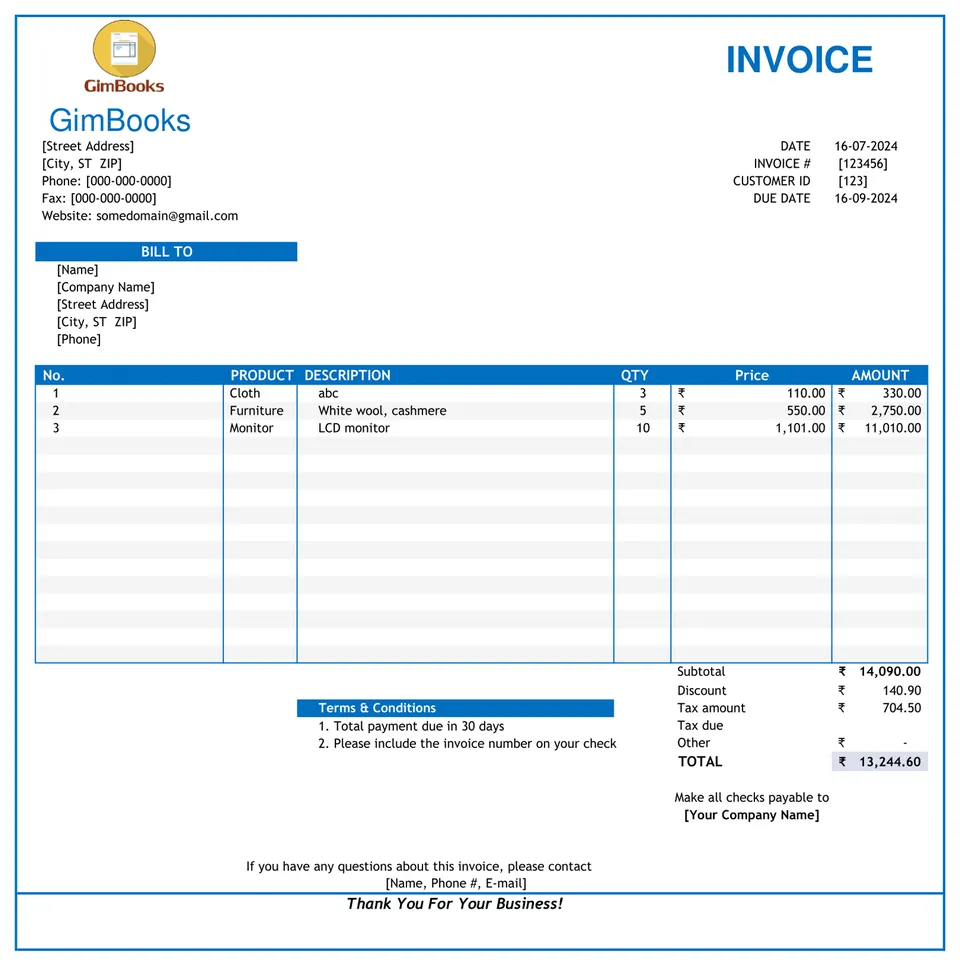
Pick Excel for editable calculations, Word for flexible editing, or PDF for printing and sharing. Before you send an invoice, check the invoice number, customer details, HSN/SAC, taxable value, GST and final amount.
-
GST invoice format in Excel
Editable rows for products or services, quantities, prices, GST rates and invoice totals. Suits small businesses that bill now and then and keep their billing records in a spreadsheet.
Download Excel format .xlsx file · 24 KB -
GST invoice format in Word
Change the layout, add your logo, or adjust the wording and terms. Useful for service providers and consultants. Word does not calculate GST unless you set up formulas, so check every taxable value and tax amount.
Download Word format .docx file · 19 KB -
GST invoice format in PDF
A ready layout with item descriptions, prices, quantities, totals, tax, discount, signature and payment terms. Print it, share it, or keep a fixed copy of the completed invoice.
Download PDF format .pdf file · 83 KB
Try GimBooks free for 7 days
Make GST invoices in seconds and manage all your billing with GimBooks.
What is a GST invoice format?
A GST invoice format is a structured template a GST-registered business uses to record the details of a taxable supply of goods or services. A good GST bill format keeps transaction details organised and makes invoices easier to review and keep for GST records.
What a GST invoice includes
- Supplier name, address and GSTIN
- Buyer details and GSTIN, where applicable
- Unique invoice number and date
- Product or service description
- HSN or SAC
- Quantity and unit, where applicable
- Rate and taxable value
- Applicable GST rate
- CGST, SGST or IGST
- Total invoice value
- Other applicable transaction details
Need the complete checklist? Read our guide to GST invoice mandatory fields for a field-by-field breakdown.
Mandatory fields in a GST invoice
A GST tax invoice should contain the particulars prescribed under Rule 46 that apply to the supply. These fields record the transaction correctly, work out GST, support return filing and help the recipient reconcile Input Tax Credit.
Supplier details
- Supplier’s legal name
- Registered address
- GSTIN
Invoice details
- Unique and consecutive invoice number
- Invoice date
- Due date, where applicable
Recipient details
- Buyer’s name
- Billing and delivery address
- GSTIN or UIN where the buyer is registered
- State and state code, where applicable
Goods or service details
- Description
- HSN or SAC
- Quantity and UQC for goods
- Unit price
- Discount
- Taxable value
GST details
- GST rate
- CGST and SGST for eligible intrastate supplies
- IGST for eligible interstate supplies
- Cess, where applicable
- Total tax
- Final invoice amount
Conditional details
- Place of supply for interstate transactions
- Delivery address, where different
- Reverse-charge status
- Export or SEZ endorsement, where applicable
- IRN-linked signed QR code, where e-invoicing applies
- Supplier’s signature or applicable digital authentication
GST invoice format vs regular invoice format
| GST invoice format | Regular invoice format |
|---|---|
| Used for taxable supplies by GST-registered businesses, where applicable | Used where GST tax particulars do not apply |
| Includes the applicable GST details | No GST breakup where GST does not apply |
| May include GSTIN and HSN/SAC, where applicable | Basic product or service and pricing information |
| Shows CGST/SGST or IGST, as applicable | No CGST/SGST or IGST split |
| Supports GST record keeping | Used for general commercial billing |
Important: the exact document requirements depend on the nature of the supply and your GST position. Check the applicable GST rules before issuing an invoice.
Business invoice formats
GST invoice formats for different businesses
-
Retail businesses
Record products, quantities, pricing, GST and customer details for everyday sales.
-
Wholesalers & distributors
Invoice many products with item-level quantities, pricing, GST and customer information, and keep sales records organised.
-
Service businesses
Set out service descriptions, fees, applicable taxes and payment information clearly.
-
Small businesses & freelancers
Excel and Word formats suit businesses that invoice now and then and need an editable document.
GST invoice in Excel
How to create a GST invoice in Excel
Follow these steps to get the business details, customer information, product or service data and GST calculation right.
- 01
Enter your business details
Business name and registered address, GSTIN, contact information and bank details where applicable.
- 02
Add invoice details
A unique invoice number and the correct invoice date. Keep a consistent numbering sequence so every invoice can be tracked.
- 03
Add customer information
Legal or trade name, billing address, delivery address, GSTIN where applicable, and state and state code.
- 04
Add products or services
For each line: description, HSN or SAC, quantity and UQC, rate and discount, and taxable value.
- 05
Select the correct tax type
CGST and SGST for a standard intrastate sale, IGST for a standard interstate sale. Check the place of supply first.
- 06
Check GST calculations
Confirm the taxable value, GST rate, CGST/SGST or IGST amounts and discounts, and that item totals match the invoice total.
- 07
Review and share
Check customer, GST, product, payment and total details. Save the invoice as PDF to send a non-editable copy.
GST invoice format in Excel: what should it include?
A GST invoice format in Excel should make it easy to enter business details, customer information, product or service details and the applicable GST, all in one editable document. Before you use an Excel invoice for a real transaction, review the GST requirements and verify every calculation.
- Business name, address and GSTIN
- Customer name and address, and customer GSTIN where applicable
- Invoice number and date
- Product or service description, with HSN/SAC where applicable
- Quantity, unit, rate and taxable value
- Discount, where applicable
- Applicable GST rate, with CGST and SGST or IGST as applicable
- Total invoice value
- Payment and other transaction details
When to use Excel: it works for businesses that create a limited number of invoices and want an editable billing document. If you bill often, software cuts out the repeated data entry and calculation work.
Checklist before you share an Excel invoice
- The invoice number is unique and in sequence
- Your GSTIN is correct
- The customer’s GSTIN is correct, where applicable
- The HSN/SAC is appropriate
- The taxable value and GST rate are correct
- CGST/SGST or IGST treatment is correct
- The invoice total matches the line-item calculations
- Customer and delivery details are correct
- All applicable invoice particulars are included
Excel, Word or PDF: which format should you choose?
Choose based on how much editing, calculation and sharing you need.
| Format | Best for | Editable | Automatic calculations | Recommended use |
|---|---|---|---|---|
| Excel | Small businesses and spreadsheet users | Yes | Yes, when formulas are set up | Creating and calculating invoices |
| Word | Consultants and service businesses | Yes | No | Customising invoice design and text |
| Printing, sharing and reference | Limited | No | Sending a final, non-editable invoice | |
| GST billing software | Businesses that invoice regularly | Yes | Yes | Billing, inventory, payments and GST reports |
For regular invoicing, GST billing software is the better choice: it cuts manual edits, calculation errors and repeated formatting work.
GST calculation example for intrastate and interstate sales
Here is how GST works out on a taxable value of ₹10,000 at 18% GST. The total tax is the same; the type of GST depends on the nature and place of supply. You can check any amount with our GST calculator.
Intrastate sale: CGST + SGST
A Maharashtra business sells goods worth ₹10,000 to a customer in Maharashtra at 18% GST.
| Particular | Amount |
|---|---|
| Taxable value | ₹10,000 |
| CGST at 9% | ₹900 |
| SGST at 9% | ₹900 |
| Total invoice value | ₹11,800 |
Interstate sale: IGST
The same Maharashtra business sells the goods to a registered customer in Gujarat.
| Particular | Amount |
|---|---|
| Taxable value | ₹10,000 |
| IGST at 18% | ₹1,800 |
| Total invoice value | ₹11,800 |
Key takeaway: the tax amount is the same in both examples, but the type of GST changes with the nature and place of supply.
GST invoice format vs GST billing software
A downloadable template is fine for occasional billing. If you invoice regularly, you need billing connected to inventory, customer balances and GST reports.
| Feature | Excel or Word template | GimBooks GST billing software |
|---|---|---|
| Create GST invoices | Yes | Yes |
| Automatic GST calculation | Only with formulas you set up | Yes |
| Customer and item records | Entered by hand each time | Saved for reuse |
| Invoice numbering | Managed by hand | Managed automatically |
| Inventory updates | A separate process | Connected with transactions |
| Payment reminders | No | Available |
| E-invoice generation | A separate process | Available |
| E-way bill workflow | A separate process | Available |
| GST reports | Compiled by hand | Available |
| Mobile and web access | Depends on the file | Available |
Use the free formats for simple invoices, or use GimBooks to create, track and manage invoices as part of a complete billing workflow. See plans and pricing; every plan starts with a 7-day free trial.
Beyond templates
Create custom GST invoices with GimBooks
Templates work for occasional billing. When you invoice every day, GimBooks gives you GST invoices with your branding, saved customers and items, and sharing in a tap, without editing a file each time.
What you get in GimBooks
- Customise the invoice with your business details and branding
- GST-compliant invoices for goods and services
- Customers, suppliers and billing records in one place
- Payment tracking and payment reminders
- Inventory that updates with every sale
- E-invoices, e-way bills and GST reports from the same invoice
FAQ
GST invoice format FAQs
Can't find what you need? Call us or write to our support team.
What is a GST invoice format?
A GST invoice format is a structured document used to record the applicable details of a taxable supply, including supplier and customer information, invoice details, goods or services, taxable value, GST and total amount.
Can I download a GST invoice format in Excel?
Yes. You can download an editable GST invoice format in Excel and customise it with your business, customer, product, pricing and applicable GST details.
Can I download a GST bill format in PDF?
Yes. A GST bill format in PDF gives you a fixed document that can be printed, shared with customers or kept for your business records.
What should a GST invoice contain?
A GST invoice should contain the applicable supplier, recipient, invoice, product or service, HSN/SAC, taxable value, GST and total-value particulars required for the transaction.
Is a GST invoice format in Excel valid?
An invoice prepared in Excel can be used when it contains the applicable invoice particulars and complies with the relevant GST requirements. Verify the information and calculations before you issue it.
What is the difference between a GST invoice and a GST bill?
"GST bill" is a common name for a GST invoice. For a taxable supply where a tax invoice is required, the document should contain the applicable GST particulars.
Can Excel calculate GST automatically?
Yes, when the right formulas are set up. Always check the GST rate, taxable value, tax split and final invoice amount before issuing the invoice.
Which is better: a GST invoice format in Excel or billing software?
Excel can work for occasional billing. Billing software suits businesses that invoice regularly and need customer, inventory, payment and GST records connected.
Free formats
More free business document formats
Ready-to-use templates for the rest of your billing, buying and shipping paperwork.
-
E-invoice format
Use an e-invoice format for IRN-linked GST invoice workflows where applicable.
-
Proforma invoice format
Share estimated billing details with customers before issuing the final invoice.
-
Quotation format
Create professional GST quotations in Excel, Word or PDF before confirming a sale.
-
Purchase order format
Prepare purchase orders with supplier, item, quantity, price and payment details.
-
Delivery challan format
Record goods movement where an invoice is not issued immediately.
-
Credit note format
Record sales returns, price reductions or invoice corrections with a credit note.
-
Debit note format
Document additional charges, upward price revisions or debit adjustments clearly.
-
E-way bill format
Prepare e-way bill details for goods movement, transport and compliance records.
Create GST invoices with GimBooks
Use a free format for occasional billing, or move regular invoicing online. Every plan starts with a 7-day free trial.

