Free download
E-invoice format in Word and PDF
Download a free GST e-invoice format with your business and customer details, invoice number and date, itemised goods, tax, totals and payment terms. Customise it to fit your business.
- Word and PDF
- Free download
- Space for the e-invoice QR code
Free downloads
Download the free e-invoice format
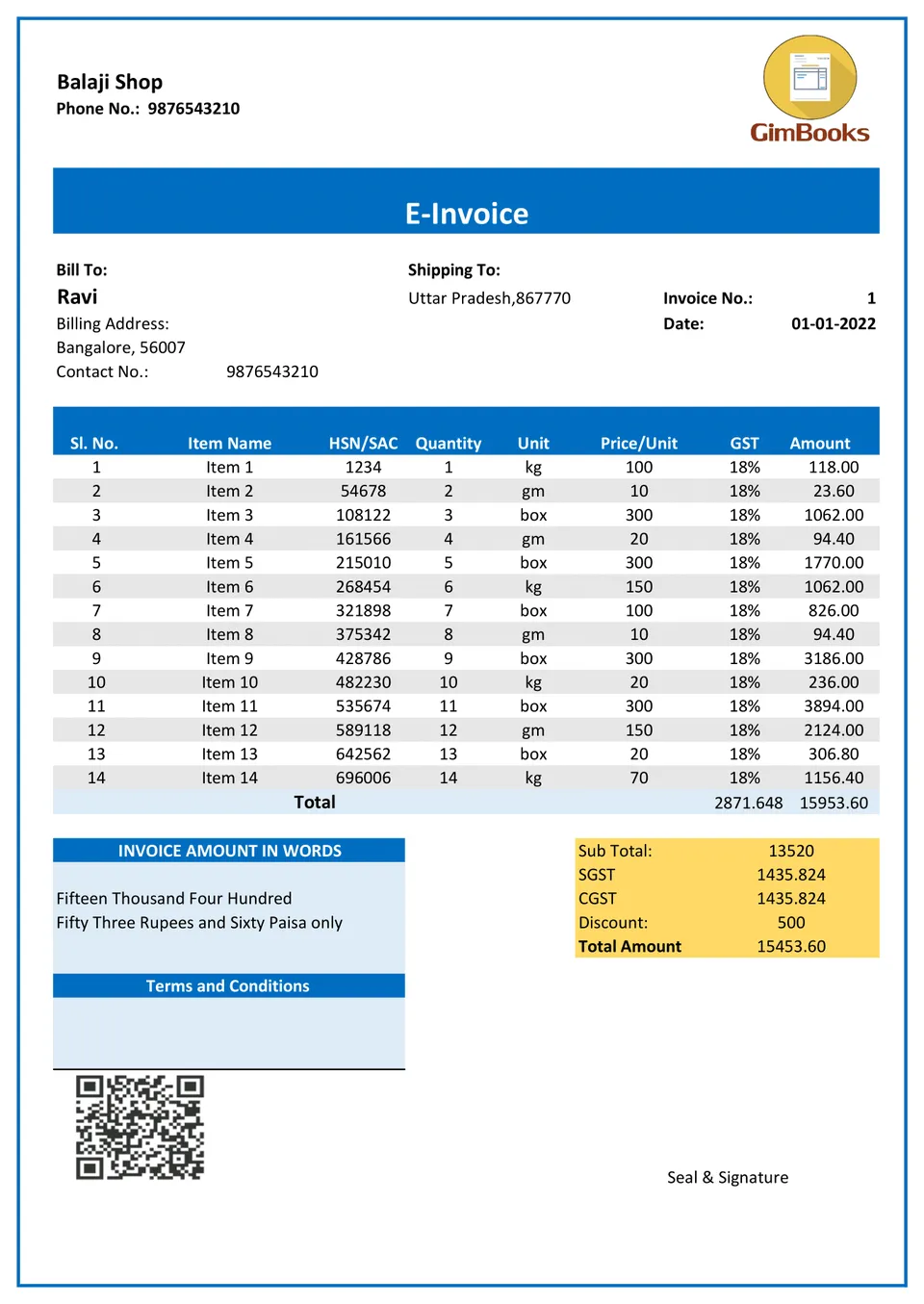
The e-invoice format comes in Word and PDF. Both have the same layout: business and customer information, invoice number and date, items with descriptions, quantities and prices, tax, subtotal, amount due and payment terms.
-
E-invoice format in Word
An editable table layout you can customise for your business. Change the wording, add your logo and fill in your own items and terms.
Download Word format .docx file · 35 KB -
E-invoice format in PDF
A fixed layout to print or share, with the same business, customer, item, tax and payment fields as the Word version.
Download PDF format .pdf file · 155 KB
Try GimBooks free for 7 days
Make e-invoices in seconds and manage all your billing with GimBooks.
What is an e-invoice format?
An e-invoice format is an invoice layout that is created and delivered electronically, which streamlines the invoicing process. Because it is stored electronically, it is easy to keep in cloud-based software like GimBooks, improves efficiency and record keeping, and leads to faster payments and better cash flow for your business.
Under GST, e-invoicing means reporting a B2B invoice to the Invoice Registration Portal (IRP). The IRP validates it and returns a unique 64-character Invoice Reference Number (IRN) and a signed QR code, which go on the invoice you share with your customer.
What the e-invoice format includes
- Your business and customer information
- Invoice number and invoice date
- Items with descriptions, quantities and prices
- Tax charges, where applicable
- Subtotal and amount due
- Payment terms
- Space for the QR code, terms and conditions, and your seal and signature
Word or PDF: which e-invoice format should you use?
| Format | Best for |
|---|---|
| Word | Editing the table layout, wording and business details to suit your business |
| A fixed copy to print, share or keep for your records |
There is no Excel version of this format. If you need spreadsheet-style calculations, start from the GST invoice format in Excel.
From a template to a real e-invoice
A downloaded template gives you the layout, but it does not make an invoice an e-invoice: only the IRP can issue the IRN and signed QR code. E-invoicing is mandatory for businesses with a turnover above ₹5 crore.
With GimBooks, the whole flow happens in your billing app:
- Link your GST e-invoice portal (IRP) API credentials once, in Settings → e-Invoice.
- Create a regular invoice for your customer.
- Tap the e-invoice action at the bottom of the invoice. The IRN and QR code are added to the invoice PDF.
- Share the e-invoice on WhatsApp or download the PDF.
E-invoice values cannot be changed after the IRN is generated. If something is wrong, cancel the e-invoice within 24 hours and issue a new one. Learn more about e-invoicing in GimBooks.
Beyond templates
Generate real e-invoices with GimBooks
A template shows the layout, but only the Invoice Registration Portal (IRP) can issue the IRN and signed QR code. GimBooks sends your invoice to the IRP in one tap and puts the QR code on the invoice PDF.
What you get in GimBooks
- Create e-invoices quickly from a regular invoice
- Customise the e-invoice in your business colours
- Create, manage and share GST-compliant e-invoices
- Invite multiple users to your account
- Unlimited e-invoices with the E-Invoicing plan
- Use it on Android, iPhone and the web
FAQ
E-invoice format FAQs
Can't find what you need? Call us or write to our support team.
What is an e-invoice format?
An e-invoice format is the layout of a GST invoice that is created and stored electronically. It lists your business and customer details, invoice number and date, items with quantities and prices, tax, totals and payment terms.
In which formats can I download the e-invoice template?
The free e-invoice format is available in Word and PDF. Both versions use the same layout and can be customised for your business.
Does a downloaded template give me an IRN?
No. The Invoice Reference Number (IRN) and signed QR code are issued by the Invoice Registration Portal (IRP) when the invoice is reported to it. In GimBooks, you make a regular invoice and generate the e-invoice from it in one tap.
Who has to issue e-invoices?
E-invoicing is mandatory for businesses with a turnover above ₹5 crore.
How do I link GimBooks to the e-invoice portal?
In the GimBooks app, go to Settings → e-Invoice and add your GST e-invoice portal (IRP) API credentials. Our support team can guide you through the setup over call or WhatsApp.
Can I cancel an e-invoice?
E-invoice values cannot be changed once it is created. You can cancel it within 24 hours of creation and issue a new invoice with the correct values. In GimBooks, open the e-invoice, tap More and select Cancel e-invoice.
Free formats
More free business document formats
Ready-to-use templates for the rest of your billing, buying and shipping paperwork.
-
GST invoice format
Bill goods and services with GSTIN, HSN/SAC, tax split and totals.
-
Proforma invoice format
Share estimated billing details with customers before issuing the final invoice.
-
Quotation format
Create professional GST quotations in Excel, Word or PDF before confirming a sale.
-
Purchase order format
Prepare purchase orders with supplier, item, quantity, price and payment details.
-
Delivery challan format
Record goods movement where an invoice is not issued immediately.
-
Credit note format
Record sales returns, price reductions or invoice corrections with a credit note.
-
Debit note format
Document additional charges, upward price revisions or debit adjustments clearly.
-
E-way bill format
Prepare e-way bill details for goods movement, transport and compliance records.
Generate e-invoices in one tap with GimBooks
Get the IRN and QR code without leaving your billing app. Every plan starts with a 7-day free trial.

