E-invoice software
Create professional e-invoices in seconds
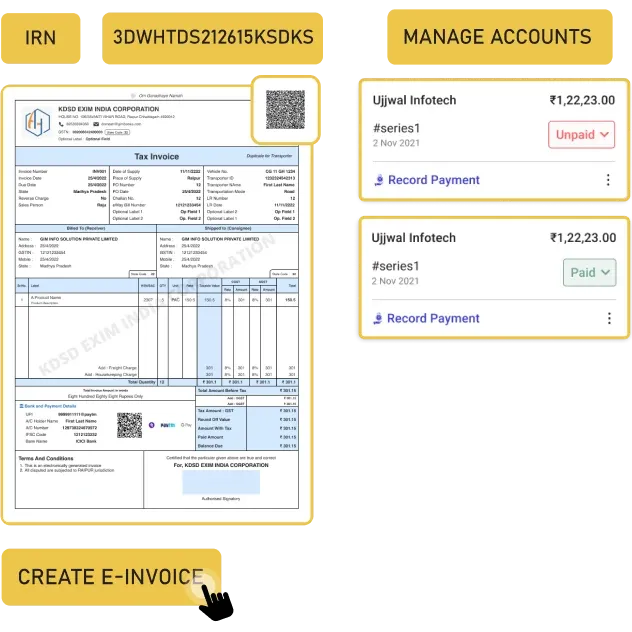
GimBooks e-invoice software helps you stay compliant, cut costs, file GST returns directly and run your business more efficiently, all in a single app.


- IRN and QR code in one tap
- E-way bill from the same invoice
- GSTR filing on app and web
GimBooks in numbers
Indian businesses bill on GimBooks every day
- App downloads
- 50 Lakh+
- Invoices created
- 2 Crore+
- E-way bills generated
- 10 Lakh+
- GST returns filed
- 10,000 +
- Backed by
- Backed by
- Recognised by

Manage e-invoices at your fingertips
Everything around the e-invoice, in one app
GimBooks covers the whole e-invoicing job, so your bookkeeping and accounting run smoothly without switching tools.
- Get the IRN easily
- Create the e-invoice in a single tap
- File GSTR from the app and the web
- Manage parties and accounts on the go
- Generate the e-way bill directly
- Record payments
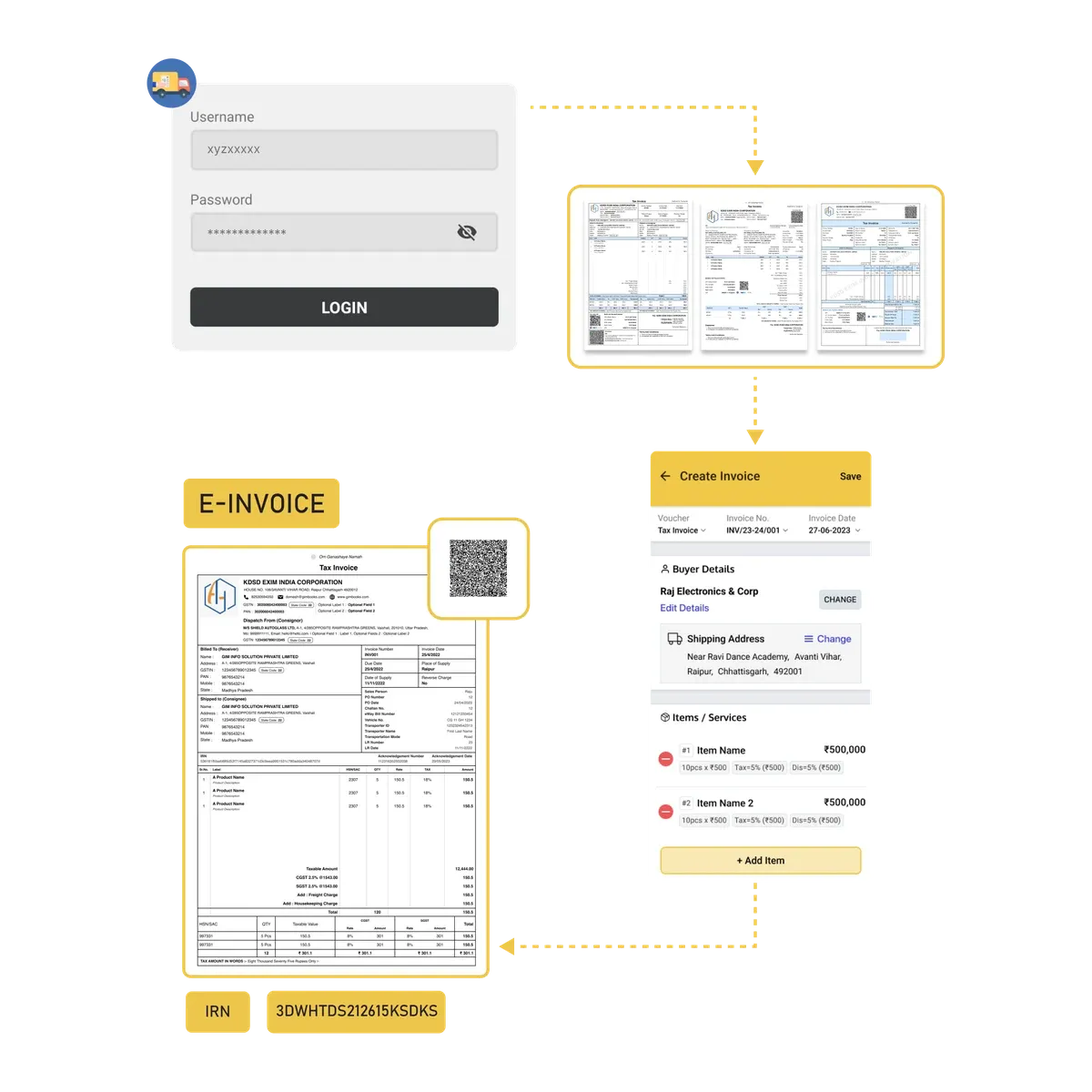
IRN and QR code
From regular invoice to e-invoice in one tap
Make a regular invoice in GimBooks, then tap the e-invoice action at the bottom. GimBooks registers it with the Invoice Registration Portal (IRP), and the IRN and signed QR code land on the invoice PDF, ready to download or share on WhatsApp.
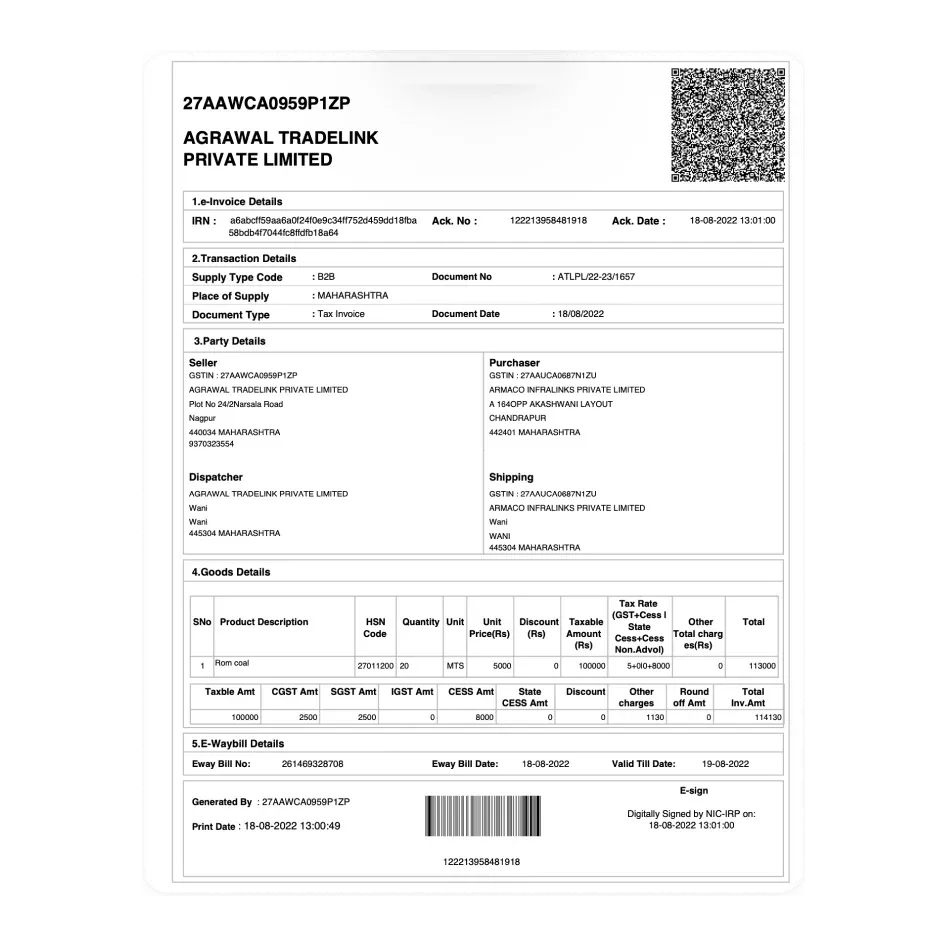
Built for e-invoicing
How GimBooks makes e-invoicing efficient
-
Easy invoice management
Enter your invoice details once and GimBooks generates the matching e-invoice.
-
Cancel in a click
Found an error? Cancel the e-invoice in a click within 24 hours of creating it, then issue a corrected one.
-
Print the IRN and QR code
Print the IRN details and the e-invoice QR code, for compliance and easy traceability.
-
E-invoice reports
Detailed invoice reports with a full view of accounts and parties help you keep every invoice error-free.
How it works
E-invoicing in four steps
Set it up once, then every e-invoice takes a tap.
- 01
Link your credentials
In Settings → e-Invoice, add your e-invoice portal (IRP) API credentials. You do this once.
- 02
Choose a template
Pick an invoice or e-invoice template in Settings → Invoice templates, then make your invoice.
- 03
Get the IRN
Tap the e-invoice action on the invoice. The IRN and QR code come back from the IRP.
- 04
Use the e-invoice
Download, print or share the e-invoice, and create the e-way bill from it.
What business owners say
-
“GimBooks E-invoices have helped my retail business grow. I used to spend countless hours printing, mailing, and storing paper invoices, which was a huge waste of time and resources.”
AS Aman Sharma Retail Business, Pune -
“As a wholesaler, I deal with a high volume of invoices every day. GimBooks E-invoices have made my life so much easier. I can now generate and send invoices electronically in a matter of minutes, and my customers can pay them online instantly.”
RJ Rohit Jain Wholesaler, Gondia -
“GimBooks E-invoices have streamlined my entire distribution process. I can now track invoices in real-time, which has helped me to improve my delivery times and customer satisfaction.”
SP Sahil Patel Distributor, Mumbai
Learn more about e-invoicing
- Guide
E-invoicing with GimBooks
How e-invoicing works in GimBooks, from linking the IRP to cancelling an e-invoice.
Read more - Free format
E-invoice format
See and download a free e-invoice format.
Get the format - Video tutorial
Video: create an invoice
Every e-invoice starts as a regular invoice. See how to make one.
Watch the video - Plans
Pricing
Compare plans, including the E-Invoicing plan for unlimited e-invoices.
See pricing
FAQ
E-invoice questions, answered
Can't find what you need? Call us or write to our support team.
What is an e-invoice?
E-invoicing is a system in which B2B invoices are authenticated electronically by GSTN for further use on the common GST portal. The Invoice Registration Portal (IRP), managed by GSTN, issues an identification number against every invoice.
What is the IRN in an e-invoice?
The Invoice Reference Number (IRN) is a unique 64-character code assigned to each invoice once the government's Invoice Registration Portal (IRP) validates it. It is built from details such as the supplier's GSTIN, invoice number and date, and it protects the e-invoice against duplication and tampering. The IRP also returns a QR code containing the IRN for verification.
What is the IRP?
The Invoice Registration Portal is the government portal that registers, validates and authenticates electronic invoices. Businesses upload their invoices to the IRP, which checks them and returns the IRN and a QR code that tax authorities can use to verify the invoice.
What are the benefits of e-invoicing?
Lower costs, with no printing, postage or paper storage; faster, more accurate invoicing through automation; quicker payments and better cash flow, since invoices arrive instantly; invoice data that is easy to store and analyse; compliance, because every invoice is authenticated by the IRP; and less paper.
How do I create an e-invoice in GimBooks?
Make a regular invoice in GimBooks, then tap the e-invoice action at the bottom of the invoice. You can do this in the app or on the web.
What fields does an e-invoice need?
The invoice number and date; seller and buyer names, addresses and GSTINs; a description of the goods or services with quantity and unit; price and total amount; the tax rate and amount; payment terms; delivery details; any discounts or adjustments; the currency; and the IRN generated by the IRP.
How do I link GimBooks to the GST portal for e-invoicing?
In the GimBooks app, go to Settings → e-Invoice and add your e-invoice portal (IRP) API credentials. Once your account is linked, you can generate e-invoices directly from GimBooks. Our support team can guide you through the setup on a call or on WhatsApp.
Where can I find e-invoicing prices?
All plans, including the E-Invoicing plan, are on the GimBooks pricing page. Every plan starts with a 7-day free trial.
Can I edit or cancel an e-invoice?
An e-invoice cannot be edited once it is created. Cancel it within 24 hours of creation and make a new invoice with the corrected values. To cancel, open the e-invoice in the GimBooks app, tap More and choose Cancel e-invoice.
Can I manage invoices from anywhere with e-invoicing software?
Yes. GimBooks is cloud-based, so you can create, send and track invoices from anywhere with an internet connection: at the office, at home or on the road.
How does e-invoice software help with GST compliance?
GimBooks works out CGST, SGST or IGST on each invoice and registers it with the IRP to get a valid IRN and QR code. The same invoice data feeds your e-way bills and your GST returns, so what you file matches what you billed.
Can I customise e-invoice templates?
Yes. Go to Settings → Invoice templates in the app or on the web to choose from a range of invoice and e-invoice templates.
Explore more GimBooks features
Every document is GST-ready and linked to the next, so nothing is typed twice.
- Invoicing GST and non-GST invoices with your logo, made in seconds and shared in a tap.
- E-invoicing Get the IRN and signed QR code for any invoice in one click.
- E-way bills Turn an invoice or challan into an e-way bill in one click.
- Inventory Stock updates itself with every sale and purchase.
- Quotations Send quotes, convert to invoices
- Proforma invoices Turn into a tax invoice in a tap
- Purchases Purchase bills, POs and vendors
- Delivery challans Original, duplicate and triplicate
- Credit notes Sales returns and corrections
- Debit notes Purchase returns and adjustments
- GSTR filing File GSTR-1 and 3B from the app
- Expenses Track spend by category
Start your 7-day free trial
IRNs, e-way bills and GST returns from one app, on your phone or computer.